How to Find Product Images by EAN (One Product or Thousands)
Missing images for hundreds of SKUs? Four ways to find product images by EAN — manual search, barcode databases, media kits and automated enrichment.
You have a product list with hundreds or thousands of items — and no usable images. The supplier sent a bare price list, the old shop exported names and codes but no media, or the photos you do have are tiny, watermarked or show the wrong variant. Missing images are one of the most common gaps in e-commerce catalogs, and they block everything downstream: you cannot publish a product page, run a Shopping ad or print a catalog without a picture.
The good news: if your list contains EAN or GTIN barcodes, images are findable. The identifier pins down the exact product and variant, so an image found by EAN is an image of that product — not a lookalike from the same series. This guide walks through four ways to get product images by EAN, from quick manual lookups to fully automated enrichment for thousands of SKUs at once.
Why images are the hardest field to fill
Most gaps in product data can be written: a missing description can be drafted, a missing category can be assigned. An image cannot be written — it has to exist somewhere, and you have to find the right one. That makes images the field where catalog work most often stalls.
- Supplier and wholesaler feeds frequently ship prices and stock levels but no media at all.
- Manufacturer websites are organized by product series, not by sellable variant — one hero shot covers ten SKUs in different colors and sizes.
- Product names are ambiguous: the same model name can refer to several revisions with different looks.
- Even when images exist, they may be too small for zoom, carry watermarks or promotional overlays, or show packaging instead of the product.
This is why searching by name alone produces so many wrong or unusable results — and why the barcode is the better key.
Why the EAN is the right starting point
An EAN (the European form of the GTIN) identifies one exact sellable article, including its variant. The blue version and the black version of the same shoe have different EANs; the 2024 revision and the 2026 revision of the same router do too. When you search by EAN instead of by name, you inherit that precision: whatever you find is tied to the exact article you sell. If the difference between EAN, GTIN, UPC and SKU is fuzzy, our guide to product identifiers covers it.
The prerequisite, of course, is that your list has EANs in the first place. If it does not, fix that first — there are reliable ways to find EAN numbers for an existing catalog, and the images will follow much more easily afterwards.
An image found by product name may show a different color or an older revision of the product. An image found by EAN shows the exact variant — which is precisely what marketplaces require and what keeps returns down.
Method 1: Search the EAN manually
The simplest approach: paste the EAN into a search engine, in quotes, and open the image results. Because barcodes are unique strings, the results are usually tightly focused — retailer listings, manufacturer pages and datasheets for exactly that article. From there you can trace the image back to its source page and grab the largest version available.
This works well — for a handful of products. Realistically each product takes a few minutes: search, open two or three candidate pages, verify the variant, download, rename the file to your SKU or EAN. At fifty products that is an afternoon. At five thousand it is simply not a plan, and the manual step where files get renamed by hand is where mislabeled images creep into catalogs.
Method 2: Barcode databases and lookup APIs
A number of public barcode databases and lookup APIs let you query product data — sometimes including an image — by EAN or UPC, one code at a time or in bulk. For a first pass over a list they can be useful, but go in with realistic expectations:
- Coverage is patchy. These databases are strongest on mainstream US and international products; regional European brands and niche categories are often missing entirely.
- Quality varies widely. Many entries are community-submitted; images can be thumbnails, packaging shots or outdated versions of the product.
- You pay per request, not per hit. Bulk lookups typically cost the same whether the database has the product or not, so a low match rate gets expensive.
- Licensing is often unclear. A database returning an image does not mean you have the right to publish it.
Before committing to any lookup service for a full catalog, run a sample of 50 representative EANs and count how many come back with a usable, correctly-sized image. That match rate — not the per-request price — determines what the service really costs.
Method 3: Go to the source — manufacturer media kits
Brands want their products presented well, and most manufacturers and distributors maintain media packs: high-resolution studio shots, multiple angles, sometimes lifestyle imagery, usually with explicit permission for resellers to use them. If you have a trade relationship, this is the highest-quality and legally cleanest source there is.
The catch is effort and speed. Media kits are requested brand by brand, arrive in every imaginable structure, and still need to be mapped file-by-file to your SKUs — the kits are rarely organized by EAN. This route shines when your catalog is concentrated on a few brands you know well, and becomes impractical when a list spans hundreds of small suppliers.
Method 4: Automated enrichment at catalog scale
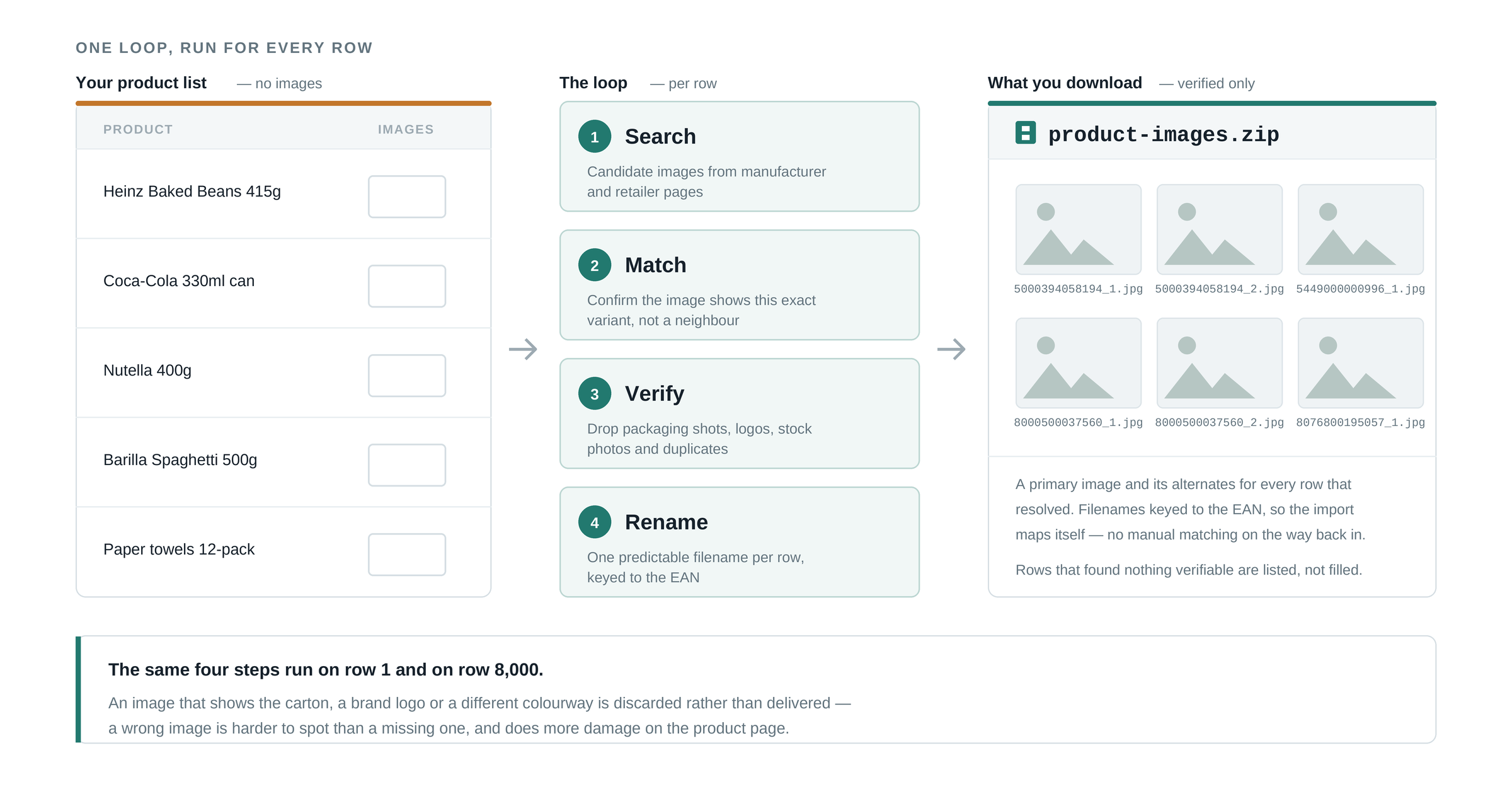
When the list is long, the practical answer is to automate the whole loop — search, match, verify, download, rename — instead of any single step of it. This is exactly what ProductBox does. You upload your product list as CSV or Excel; for every row, ProductBox finds the product on the open web (by EAN when present, by name and brand when not), verifies that the match really is your product, and returns the enriched record: verified images alongside names, brands, barcodes, categories, descriptions and specifications.
- Upload your list — messy columns are fine; the importer maps them automatically.
- ProductBox matches every row and verifies each result against the source, so an image is only attached when it belongs to that exact product.
- Review the results in the app — each enriched product shows where its data came from.
- Export a ZIP with the images included, files named by your SKU or EAN, ready for import into your shop or PIM.
Pricing follows the outcome: you pay per successfully enriched product, not per attempt. A product that cannot be found and verified costs nothing — which matters precisely on the long-tail catalogs where lookup databases are weakest.
What makes a product image usable: a quick checklist
However you source images, apply the same bar before anything goes live. Marketplaces enforce most of these, and shops benefit from all of them:
- Resolution: aim for at least ~1,000 px on the longest side so zoom works; bigger is better.
- Main image on a white or neutral background, with the product filling most of the frame.
- No watermarks, logos or promo text on the image — a common cause of Shopping-ad disapprovals.
- The correct variant — the color and version shown must match the EAN it is attached to.
- Consistent format and naming — one aspect ratio across the catalog, files named by SKU or EAN.
A note on image rights
Finding an image and being allowed to publish it are two different questions. Manufacturer imagery is generally provided so that resellers can present the product, and using it for products you legitimately sell is standard practice — but photos that a competitor produced themselves (their own studio shots, on their models, in their setting) are theirs, not the manufacturer's. Prefer images that trace back to the brand, keep a record of where each image came from, and when in doubt ask your distributor — most will happily send the official assets.
The takeaway
Missing product images stop being a research project the moment your list has EANs: the barcode turns a fuzzy search into an exact lookup. Search manually when you have ten products, request media kits when your catalog lives on a few brands, sample a barcode database before trusting it — and when the list runs into the hundreds or thousands, let enrichment do the whole loop and hand you a ZIP that is ready to import.
Frequently asked questions
Can I find product images using only an EAN?
Often, yes. The EAN identifies one exact variant, so searching it turns up retailer and manufacturer listings for that specific product rather than a similar one — which is why it beats searching by product name. What it cannot do is guarantee a result: private-label goods and products never sold through barcode retail may have no public imagery at all.
Can I use manufacturer product images on my own shop?
Usually yes for products you actually sell, and many brands provide media kits precisely for this — but permission comes from the brand, not from the image being publicly visible. Check the media-kit terms or your supplier agreement, and never lift photography from a competitor's storefront: those images are their work, not the manufacturer's.
How do I get product images for a whole catalog?
Manual search stops scaling within a few dozen products. At catalog scale the images have to be found the same way the rest of the record is — by identifying each row against live sources and pulling the imagery tied to that verified product, then exporting the files alongside the data rather than hunting for them one SKU at a time.
Ready to clean up your product list?
Upload a raw CSV or Excel file and get back verified names, EANs, categories, descriptions and images. First 25 products are free.
Get started free →