How to Find the EAN Number for Any Product (4 Reliable Ways)
Need the EAN or GTIN for a product? Four reliable ways to find it — packaging, retailer listings, barcode databases and your supplier — plus how to verify it.
Sooner or later, every catalog project hits the same wall: you need the EAN number for a product, and it is nowhere in your data. Marketplaces refuse the listing without it, your feed tool flags the row as incomplete, and deduplication becomes guesswork — because without a global identifier, "Logitech MX Master 3S" and "MX MASTER3S GRAPHITE" look like two different products.
The good news is that almost every retail product made in the last few decades has an EAN, and finding it is a solvable problem. There are four reliable ways to do it: read it off the packaging, pull it from retailer and manufacturer listings, query a barcode database, or request it from your supplier. This guide walks through each method, when to use it, and how to verify the numbers before they enter your catalog. If you first want a refresher on what an EAN actually is and how it relates to GTIN and UPC, read our guide to product identifiers — this article is purely about how to find one.
- 1. Product packaging — fastest for a single item you have in hand.
- 2. Retailer and manufacturer listings — when you do not have the product.
- 3. Barcode databases and GS1 verification — to confirm a candidate code.
- 4. Your supplier or the manufacturer — cleanest for whole assortments.
1. Check the product packaging — the fastest way for a single item
If you have the physical product in front of you, the EAN is almost certainly printed on it. Look for the barcode: the 13 digits printed directly beneath the bars are the EAN-13. You will usually find it on the back panel, the bottom of the box, or a sticker near the regulatory markings. Some packaging labels it explicitly as "EAN", "EAN-13" or "GTIN-13"; most just print the number under the barcode with no label at all.
Two things to watch for. First, products sold in North America often carry a 12-digit UPC instead — that is the same system, and adding a leading zero turns it into a valid 13-digit GTIN. Second, multipacks and outer cartons carry their own codes: the EAN on a case of 12 is not the EAN of the single unit inside it. Always take the number from the sellable unit you actually list.
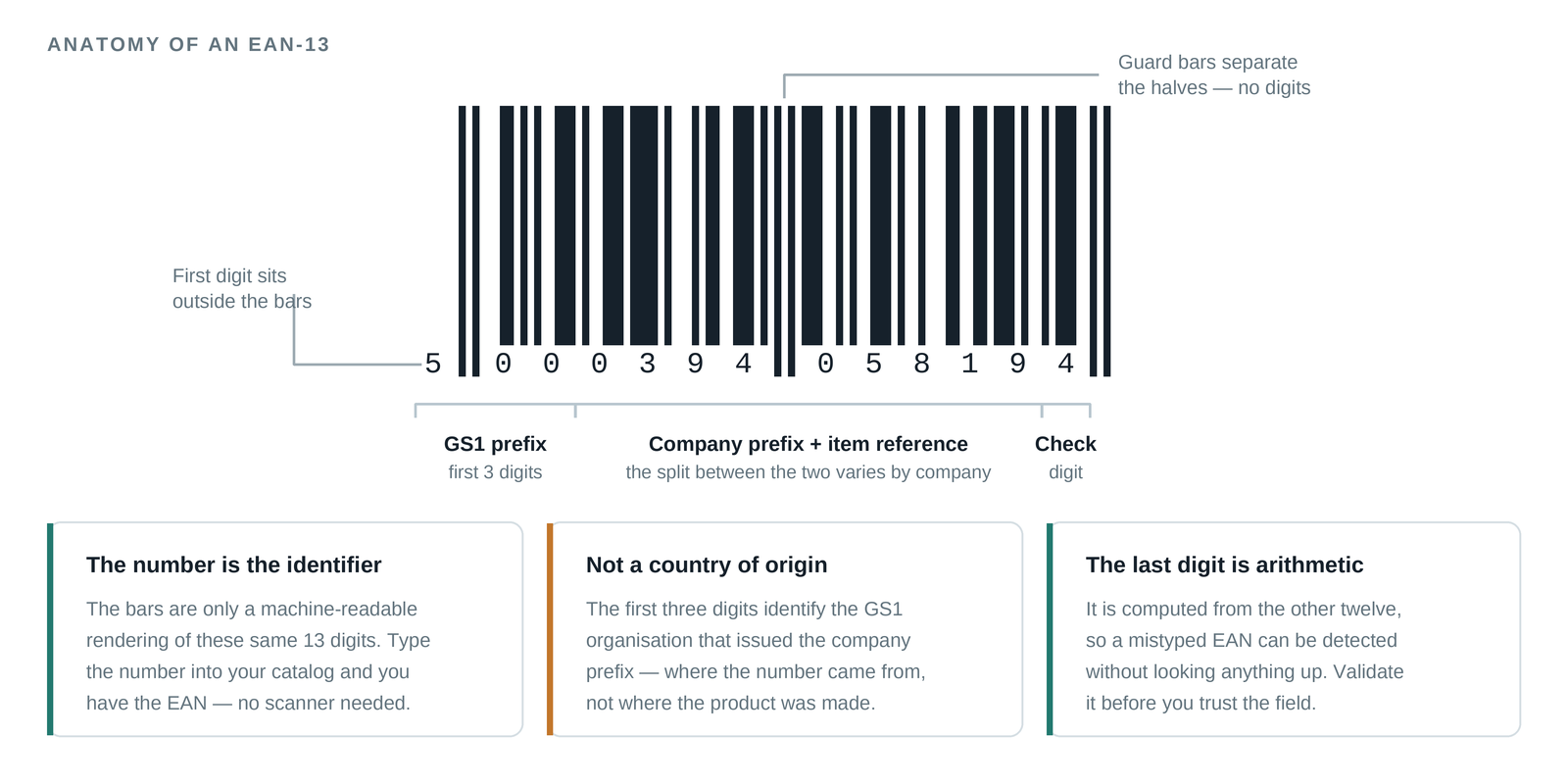
This method is definitive — the manufacturer printed it, so it is correct. Its only limitation is scale: it works for the box on your desk, not for a spreadsheet with 5,000 rows.
2. Search retailer and manufacturer listings online
No physical product? Search for the brand and exact model number together with "EAN" or "GTIN". Many online shops publish the EAN in the specifications table of the product page, and manufacturer websites and PDF datasheets often include it alongside the model number. Price-comparison sites are another good source, since they rely on EANs internally to group offers for the same product.
The catch is accuracy. Listings are written by people, and people paste the wrong code more often than you would expect — a neighbouring variant, the predecessor model, or a code for a different region's edition. Treat a single listing as a claim, not a fact.
- Cross-check the number against at least two independent sources before you trust it
- Match the exact model number, not just the product family — "MX Master 3" and "MX Master 3S" have different EANs
- Remember that every variant has its own EAN: each colour, size, storage capacity and bundle is a separate code
- Prefer the manufacturer's own site or datasheet over third-party shops when they disagree
If two sources show different EANs for what looks like the same product, you are usually looking at two variants or two regional editions — not an error. Pin down which one you actually sell before picking a code.
3. Use a barcode database or EAN lookup service
Several public databases let you search by EAN to see what product a code belongs to, or search by product name to find candidate codes. They are useful in both directions: confirming that a number you found matches the product you think it does, and finding a code when listings come up empty.
Quality varies widely. Many databases are crowdsourced or scraped, so entries can be stale, incomplete or simply wrong. The most authoritative check is GS1 itself — the organisation that issues these numbers runs a verification service that tells you which company licensed a given EAN. That confirms the brand owner behind the number, which is excellent for catching fakes and miscodes, though it will not always give you full product details like descriptions or images.
Use databases as a verification layer rather than a single source of truth: find a candidate EAN via a listing or supplier, then confirm the registered brand matches the product's actual brand.
4. Ask the manufacturer or your supplier
If you buy the products you sell, the cleanest source of EANs is upstream. Your supplier's ERP system almost certainly has a GTIN field on every article, and most suppliers will happily add it to your price list or product export if you ask. The brand owner is the ultimate authority — they licensed the numbers — but distributors and wholesalers carry them too.
When you request the data, be specific about what you need so you get usable columns rather than a PDF of packshots:
- The EAN/GTIN-13 for each sellable unit (not the case or pallet code)
- The manufacturer part number (MPN) and the brand name as registered
- A clear mapping of variants — which EAN belongs to which colour, size or capacity
- The data as CSV or Excel, with the EAN column formatted as text so leading zeros survive
If you work with suppliers long-term, make the GTIN a required field in your onboarding template. Every hour spent enforcing that saves ten hours of lookup work later.
What if the product has no EAN at all?
Some products genuinely have no EAN: own-brand and white-label goods you produce yourself, handmade items, bespoke or made-to-order products, and some very old stock. In that case there is nothing to find — and two things you must never do. Do not invent a number, and do not reuse a code from a similar product. Marketplaces increasingly validate GTINs against the GS1 registry, and a mismatched code gets listings suppressed or accounts flagged.
The legitimate options are to license your own GTINs directly from GS1 — you get a company prefix and assign a number to each variant you sell — or, where a sales channel allows it, to declare explicitly that the product has no identifier using that channel's mechanism for it. Be wary of cheap "EAN packs" from third-party resellers: numbers that are not registered to your company can fail GS1 validation, and fixing that after the fact means relisting everything.
How to verify an EAN before it enters your catalog
Wherever a number came from, verify it before it touches your systems. The first check is mathematical: the 13th digit of an EAN-13 is a check digit computed from the first twelve, so any single-digit typo makes the code invalid. Any EAN validator (or a short spreadsheet formula) catches these instantly. The second check is semantic: look the code up and confirm the registered brand and product actually match what you are selling — a code can be mathematically valid and still belong to the wrong product.
The third check is the one most teams learn the hard way: spreadsheet formatting. Excel loves to destroy EANs — it strips the leading zeros off converted UPCs and renders long numbers as scientific notation like 8,80609E+12, which silently corrupts the code on save. We cover this failure mode — and how to recover from it — in how to fix EAN barcodes in Excel.
Always store EAN columns as text, never as numbers. If you ever see an EAN ending in several zeros or displayed with an E+ in it, the value is already corrupted — go back to the source and re-import it.
Takeaway: match the method to the scale
Finding an EAN is a different job at different scales. For a single product, read the packaging or check the manufacturer's listing and confirm it against a barcode database. For a supplier's assortment, request GTINs upstream and make them a required field. Whatever the source, validate the check digit, confirm the brand, and keep the column formatted as text.
And the EAN is only the key — once your rows carry identifiers, an enrichment run turns them into complete records: verified names, brands, categories, descriptions, specifications and images, each cross-checked against the sources it came from.
Frequently asked questions
How do I find EANs for thousands of products at once?
The reliable path at scale is upstream: request GTINs from your suppliers and make them a required field in every price list and onboarding template. Guessing codes from product names at catalog scale is how catalogs get poisoned — any candidate code should be verified against the registered brand and at least two independent sources before it is trusted. Once identifiers are in place, product enrichment fills in the verified record around them.
Are free EAN lookup databases reliable?
As a verification layer, yes; as a single source of truth, no. Many are crowdsourced or scraped, so entries can be stale or miscoded. Confirm the registered brand behind a code with GS1's verification service, and cross-check any code against at least two independent sources before it enters your catalog.
Can I create my own EAN numbers?
Not by inventing them. EANs must be licensed from GS1 — you receive a company prefix and assign one code per sellable variant. Never make up a number or reuse one from a similar product: marketplaces validate codes against the GS1 registry, and a mismatch can suppress listings or flag your account.
Ready to clean up your product list?
Upload a raw CSV or Excel file and get back verified names, EANs, categories, descriptions and images. First 25 products are free.
Get started free →