How ProductBox Matches Product Data: From Web Search to AI
Inside ProductBox's enrichment pipeline: how messy spreadsheet rows become verified product data, and the confidence thresholds that decide what you pay for.
The hardest part of product data enrichment isn't finding information online — it's making sure the information you find describes exactly the product in your spreadsheet, and not a different size, colour, bundle or successor model. A wrong barcode or a spec table from a neighbouring variant is worse than an empty field: it looks complete, so nobody checks it, and it quietly breaks listings, filters and marketplace feeds downstream.
This article walks through how ProductBox turns a raw CSV or Excel row into verified product data — the actual pipeline, step by step: cleaning your input into a usable search query, crawling multiple live sources, letting AI extract and judge what's usable, scoring every candidate match, and only charging you when a row is successfully enriched. No single step is magic; the accuracy comes from how the steps check each other.
Why product matching is the hard part of enrichment
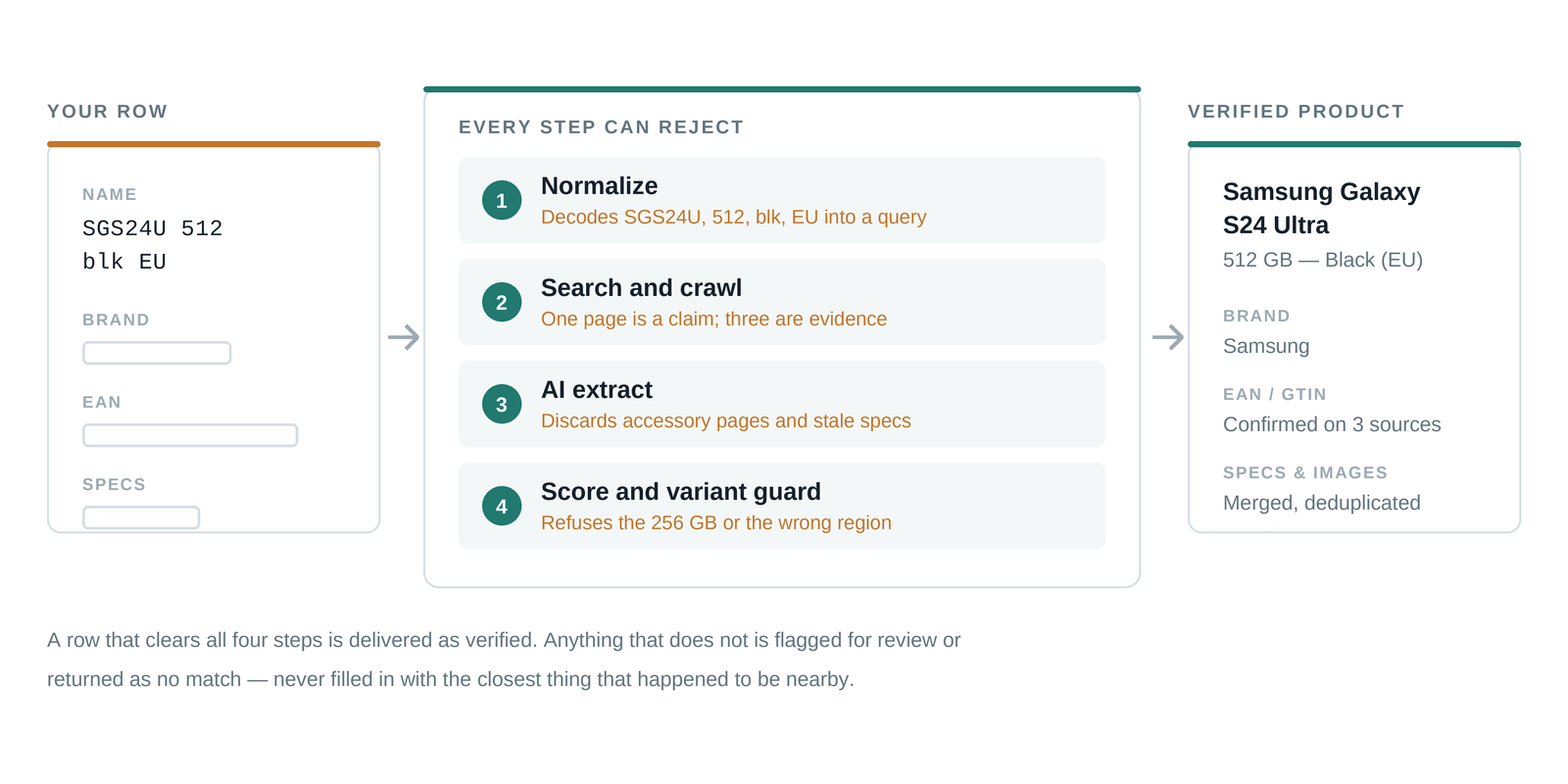
Supplier lists and legacy exports are rarely clean. A typical row might read "SGS24U 512 blk EU" — abbreviated model codes, units glued to numbers, missing brand names, internal shorthand nobody outside your company understands. Meanwhile, the same physical product exists online under dozens of slightly different names, and next to it sit near-identical variants that differ only in storage size, region or packaging.
Matching, then, is really two problems stacked on top of each other: identification (which real-world product is this row talking about?) and verification (does this web page describe that exact product, or something that merely looks like it?). A pipeline that solves only the first problem produces fast, confident, wrong data. Ours treats verification as a first-class step with its own scoring — and every row that can't be verified is flagged rather than guessed.
Step 1: turning messy rows into search queries
Before anything is searched, each row is normalized by an LLM into a clean search query. The model decodes abbreviations, separates units from numbers, restores brand names and strips internal codes that mean nothing to the open web. "SGS24U 512 blk EU" becomes a query a search engine can actually work with: brand, model, capacity, colour.
This step matters more than it sounds. Search quality is capped by query quality — a garbled query returns garbled candidates, and no amount of downstream AI can recover a product that was never found. Normalization is also where obvious duplicates and unusable rows get caught early, before they consume any search budget.
The better your input, the higher your auto-accept rate. Even one extra column — brand, EAN, or model number — dramatically narrows the candidate space and reduces the rows that need human review.
Step 2: finding the product online — fresh data, multiple sources
With a clean query, the pipeline searches the live web and crawls the most promising result pages: manufacturer sites, retailer listings, spec databases. This is fresh product data fetched at enrichment time, not a stale database dump — so discontinued colourways, updated packaging and revised spec sheets are reflected as the web currently describes them.
Crucially, no product relies on a single page. At least two independent sources are collected for every product, and that redundancy is what makes verification possible later: a barcode that appears on three independent pages is evidence; a barcode that appears on one page is a claim. Where sources disagree, the disagreement itself is a signal that the row needs a closer look rather than a confident guess.
- Manufacturer pages anchor the canonical name, model number and official specifications.
- Retailer listings contribute EAN/GTIN barcodes, market-facing titles and current images.
- Cross-source agreement turns individual claims into verified facts — and flags conflicts before they reach your catalog.
Step 3: AI extraction — deciding what's usable and what isn't
Raw web pages are noisy: related-product carousels, "customers also bought" blocks, outdated cached specs, accessory listings that mention the main product by name. The extraction step uses AI to pull structured data out of each source — name, brand, barcode, category, product description, specifications, product image URLs — and, just as importantly, to judge what is high-quality enough to keep.
A spec table scraped from an accessory page gets discarded. A description that's actually about the previous model generation gets discarded. An image that shows the retail box instead of the product can be deselected. The output of this step isn't "everything we found" — it's the subset of findings that survived quality filtering, each still tied to the source it came from.
Merging sources into one record
The surviving data from all sources is then merged into a single candidate record. Fields where sources agree are filled with confidence; the richest verified spec table wins over thin ones; duplicate images are collapsed. The result is one coherent product record per row — built from several pages, but internally consistent.
Step 4: match scoring, the variant guard and confidence thresholds
Now comes the step that gives the whole pipeline its accuracy: every candidate match is scored against your original row. Does the brand match? Does the model number match exactly, or only partially? Do capacity, colour and region line up? A dedicated variant guard specifically targets the classic failure mode of product matching — confidently returning the 256 GB version when your row says 512 GB, or the EU plug when your row says UK.
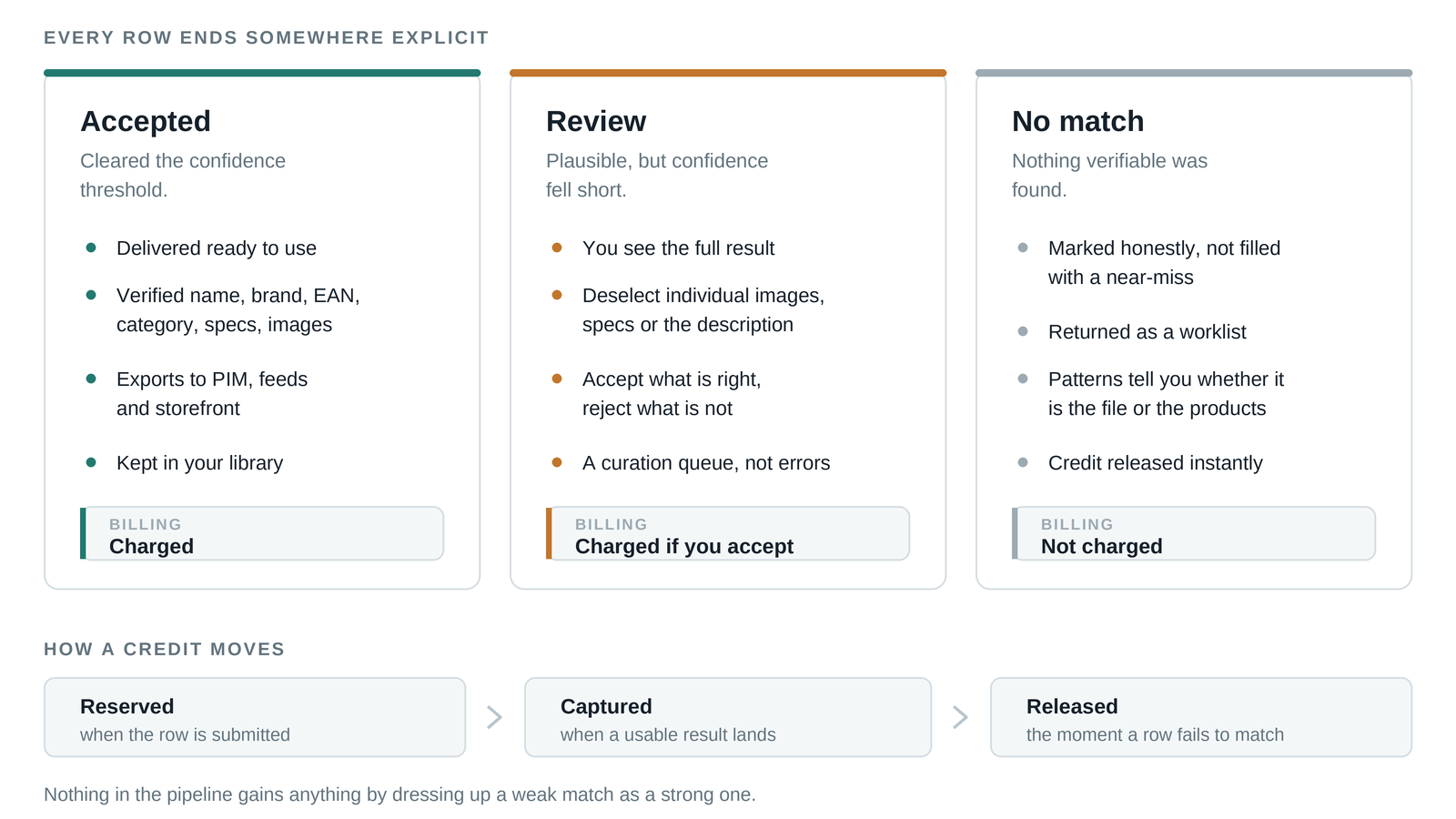
The score determines what happens to the row. ProductBox sorts every result into one of three explicit outcomes rather than pretending everything succeeded:
- Accepted — the match cleared the 0.85 confidence threshold. The data is delivered as ready to use.
- Review — a plausible match was found, but confidence fell short. You see the full result and decide, with the option to deselect individual images, specs or the description before accepting.
- No match — nothing verifiable was found. The row is marked honestly, and you are not charged for it.
That last outcome is the pricing model doing quality-control work: because you pay only per successfully enriched product, there is no incentive anywhere in the pipeline to dress up a weak match as a strong one. A credit is set aside when a row is submitted, captured only when a usable result is delivered, and released instantly when the row comes back as no-match or failed.
Treat the review queue as a curation step, not an error list. Rows land there precisely because the pipeline refused to guess — a two-minute human decision on those rows is what keeps your accepted data trustworthy.
What you get — and what it replaces
The output is catalog-ready product data: verified names and brands, EAN/GTIN barcodes, categories, clean product descriptions, structured product specification tables and product images. It exports in formats built for e-commerce platforms, PIM systems and marketplace feeds, so the data drops into your existing stack rather than creating a new integration project. The most-used export formats are CSV and JSON, with images delivered in a zip alongside.
Done manually, this exact workflow — search each product, open several pages, cross-check the variant, copy the specs, download the images, repeat a few thousand times — is days or weeks of skilled, tedious work per catalog. The pipeline runs it for a fraction of the cost of hiring someone for the job, and applies the same verification discipline to row 4,000 as it does to row 1. Humans stay in the loop where they add the most value: deciding the borderline cases, not doing the searching.
Where accuracy compounds over time
Products you've already accepted go into your library — enriching the same catalog again, or an overlapping supplier list, doesn't repeat work you've already verified and doesn't charge you again for it. Accuracy, once established for a product, is an asset you keep.
The takeaway: accuracy is a pipeline property, not a promise
No single technique makes product matching accurate. What works is the stack: normalize the input so search can succeed, pull multiple fresh sources so claims can be cross-checked, let AI extract and filter so only quality data survives, score every match against the original row so variants can't slip through, and route anything uncertain to review instead of guessing. Then align the pricing with the outcome, so a failed match costs you nothing.
The fastest way to evaluate a pipeline like this is to run your own messiest rows through it and inspect what comes back — including what it refuses to match.
Frequently asked questions
How accurate is automated product enrichment?
Accuracy depends on input quality, but the pipeline only auto-accepts matches that clear a 0.85 confidence score and are cross-checked across at least two independent sources. Anything below that goes to review or comes back as no-match — so the accepted set stays trustworthy even when the input list is messy.
What happens when no product match is found?
The row is marked as no-match rather than filled with a guess, and the credit reserved for it is released. An honest gap is cheap to deal with; a wrong barcode that looks right is not.
Do I pay for rows that fail to enrich?
No. A credit is captured only when a row comes back successfully enriched. No-match and failed rows cost nothing, and rejecting a wrong match in review refunds 0.9 of the credit.
Ready to clean up your product list?
Upload a raw CSV or Excel file and get back verified names, EANs, categories, descriptions and images. First 25 products are free.
Get started free →