How Product Matching Works: From Messy List to Verified Data
How half-broken supplier names become verified catalog records: normalization, candidate search, scoring and verification — plus how to lift your match rate.
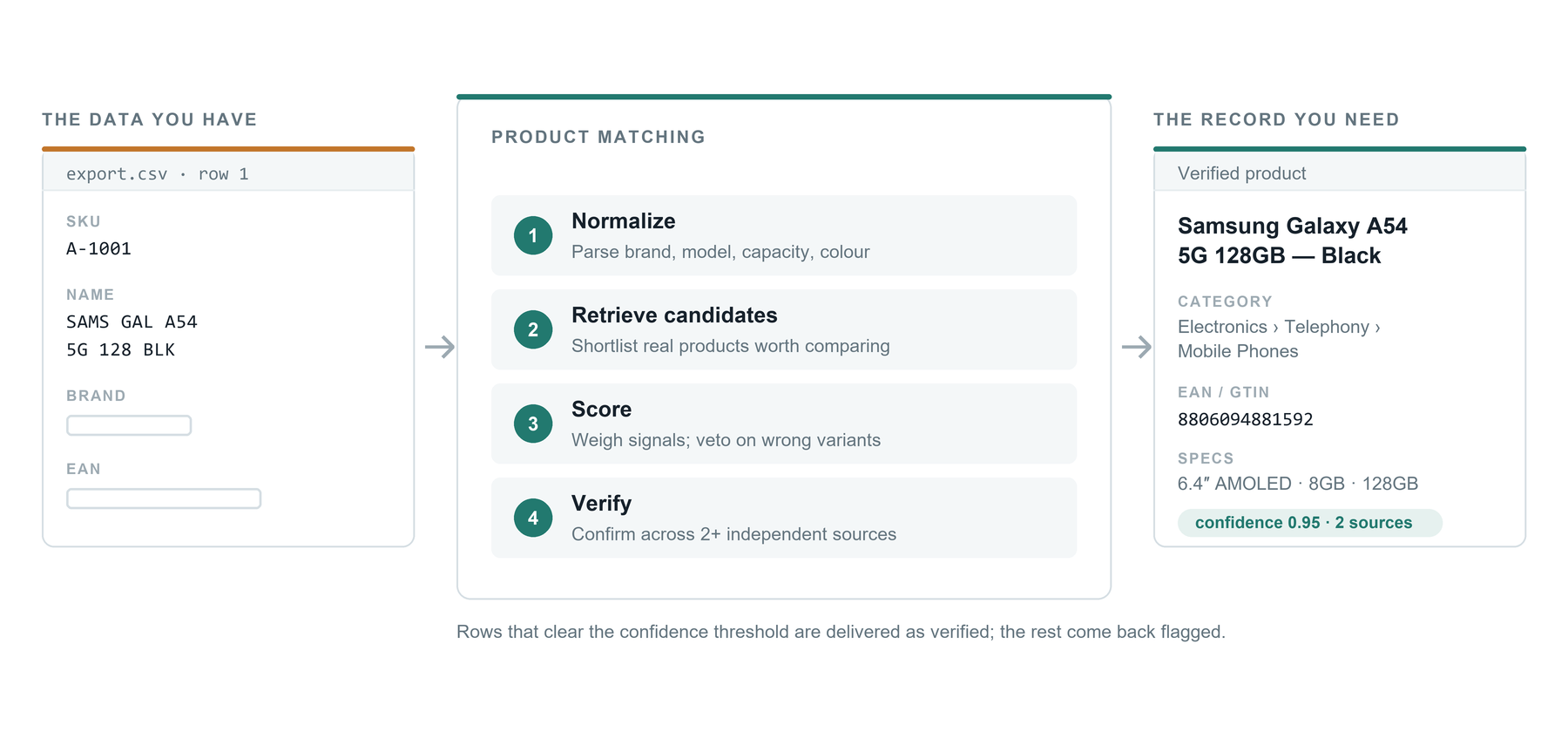
Most product data problems are really matching problems. You have a spreadsheet with 8,400 rows that says things like SAMSNG 55" QLED TV Q60C 2023 blk, a supplier SKU, and a price — and you need a real product record: correct brand, correct model, a valid EAN, a category, specifications and images. Nothing in that row tells a computer which product it is. Something has to bridge the gap between the string you have and the product that exists in the world.
Product matching is that bridge. It is the process of resolving a messy, partial, human-written product reference to a single, verified product identity — and then attaching clean attributes to it. Done well, it is not a fuzzy string comparison; it is a pipeline of normalization, candidate retrieval, multi-signal scoring and verification, with an explicit confidence score attached to every decision. This article walks through how that pipeline works, why it fails when it fails, and what you can do on your side of the file to make it work better.
What product matching actually means
The goal of matching is identity resolution: deciding that the row in your file and a known product record refer to the same physical thing. That is a stricter goal than "find something similar." A 128 GB phone and a 256 GB phone of the same model are similar; they are not the same product, and treating them as the same corrupts your catalog, your feeds and your inventory.
So a matching system has to do two opposite jobs at once. It must be tolerant enough to recognise that Bosch WAN28281GB washing machine 8kg and Bosch Serie 4 WAN28281GB are the same product despite very different strings. And it must be strict enough to refuse to merge two records that differ on a variant-defining attribute — capacity, colour, size, pack quantity, model year, region. Most bad enrichment output comes from systems that are only good at the first job.
The identifiers that carry the most weight
Matching gets dramatically easier when the row contains something globally unique. In descending order of usefulness, these are the fields worth hunting for in your export before you upload anything.
- GTIN / EAN / UPC — the barcode number. A valid GTIN is the strongest signal available: it is globally unique, checksum-verifiable, and variant-specific. A 13-digit EAN identifies not just "the washing machine" but that exact configuration.
- MPN (manufacturer part number) — unique within a brand, so MPN plus brand is close to as good as a GTIN. Very common in electronics, tools, automotive and industrial catalogs.
- ASIN, ISBN and other marketplace or vertical identifiers — narrower in scope but highly reliable where they apply. ISBN, for books, behaves like a GTIN.
- Brand + model number — usually resolvable, though model numbers are often written inconsistently across regions and channels.
- Free-text title alone — the weakest signal, and the one most files rely on. Workable, but it is where errors concentrate.
- Supplier SKU — useful for deduplication inside your own data, but meaningless outside your supplier's system. It is not an identifier a matching engine can resolve against the world.
Before you conclude your file has no barcodes, check every column — GTINs regularly hide in fields named ref2, code, barcode_supplier or in a notes column. Recovering even 30% of your rows into identifier-based matching noticeably raises overall accuracy.
How the matching pipeline works, step by step
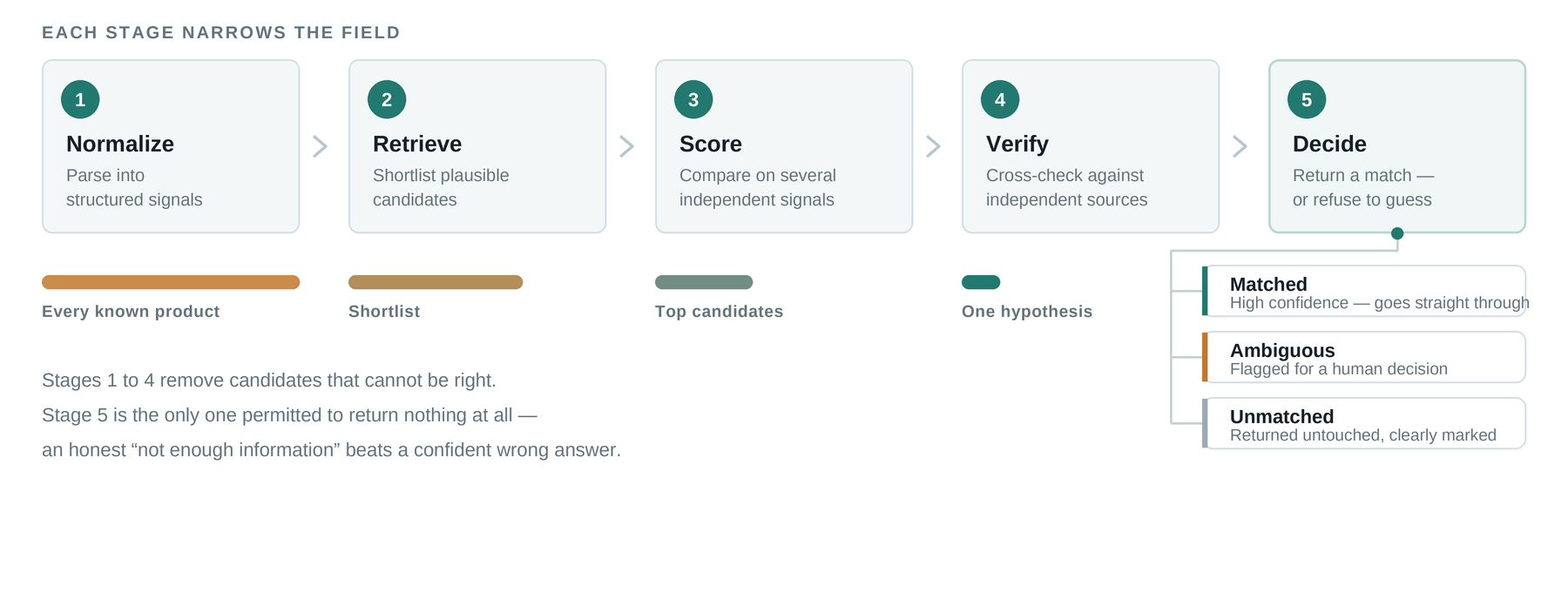
1. Parsing and normalization
The raw string is first turned into structured signals. That means lowercasing and stripping punctuation, but also much more product-specific work: expanding and correcting brand aliases (SAMSNG, Samsung Electronics, SAMSUNG® all collapse to one brand entity), separating model tokens from marketing words, parsing units and converting them to a common base (8kg, 8 kg, 8000g), detecting pack quantities (6x330ml), and pulling out colour, size and capacity tokens. Any GTIN candidate is checksum-validated at this stage — an invalid check digit means the number is a typo or a supplier-internal code, not a barcode, and should never be trusted as an identifier.
2. Candidate generation
Comparing every input row against every known product is computationally impossible at catalog scale, so the system retrieves a shortlist first. If a valid GTIN is present, the shortlist is a direct lookup and usually has one entry. Otherwise, candidates are retrieved through a combination of inverted-index search on distinctive tokens (the model number, not the word "wireless") and vector similarity on embeddings of the title, which catches paraphrases and word-order differences that keyword search misses. Brand and category act as filters that keep the shortlist small and relevant.
3. Scoring and comparison
Each candidate is then scored against the input on multiple independent signals rather than a single similarity number. Typical signals include token overlap weighted by how rare each token is, edit distance on model numbers, agreement of parsed attributes, brand identity, category compatibility and price plausibility. Some signals are veto signals: if the input says 256 GB and the candidate is 128 GB, no amount of title similarity should rescue the match. This is the mechanism that stops variant collapse, and it is the part cheap matching typically omits.
4. Verification
A good pipeline treats the top-scoring candidate as a hypothesis, not an answer. Verification checks that the hypothesis holds up against independent evidence — that the GTIN resolves to the same brand under GS1 prefix rules, that the manufacturer's own listing shows the same model, that specifications agree across more than one source. Cross-source agreement is what separates a verified record from a plausible guess, and it is why enriched attributes should be traceable back to where they came from.
5. Decision and confidence
Finally the system emits a decision with a confidence score: matched, ambiguous or unmatched. Ambiguity is a legitimate outcome — if two candidates score nearly identically and differ on a real attribute, the honest answer is "not enough information," not a coin flip presented as a fact.
Why plain fuzzy text matching is not enough
String similarity treats all characters as equally meaningful, which is exactly wrong for product data. In iPhone 15 Pro 256GB Natural Titanium, the characters that matter most — 15, Pro, 256 — are a small fraction of the string. Two genuinely different products can be 95% identical as text, while the same product written by two suppliers can be under 50% identical.
The failure modes are predictable and worth recognising in your own output:
- Variant collapse — sizes, capacities, colours or pack counts merged into one record. The most damaging error, because it silently breaks pricing and stock.
- Accessory confusion — a case, charger or replacement filter matched to the main product it mentions in its title.
- Brand hijacking — a compatible third-party part matched to the OEM part it is designed to fit.
- Bundle mismatch — a two-pack matched to the single unit, or vice versa.
- Stale generation — last year's model matched to this year's, where only a year or a single letter differs in the model code.
When you audit a matching result, do not sample randomly — sample from the lowest-confidence matched rows and from product families with many variants. That is where nearly all real errors live, and 50 rows chosen that way tell you more than 500 chosen at random.
Confidence scores and how to use them
A confidence score is only useful if you act on it differently at different levels. Treat it as a routing instruction, not a decoration. High-confidence matches — identifier-verified, attribute-consistent, cross-source agreed — can flow straight into your catalog and your channel feeds. Mid-confidence matches are better held for a quick human check before they reach marketplaces with strict content rules. Low-confidence and ambiguous rows should go back to sourcing rather than into the catalog.
The right threshold depends on cost of error, not on a universal number (ProductBox's auto-accept line sits at 0.85, with everything below routed to review). If a wrong record means a returned order and a marketplace penalty, set it high and accept a lower match rate. If you are building an internal analytics view, a looser threshold is fine. Whatever you choose, keep the score in your data so you can re-review later; discarding it means every future audit starts from zero.
How to raise your match rate before you upload
Match rate is determined as much by input quality as by the engine. A handful of preparation steps typically move the number more than any tuning on the matching side.
- Keep every column you have. Brand, MPN, supplier name, category and even price all act as disambiguating signals. Uploading titles alone throws away the context that resolves hard cases.
- Put brand in its own column rather than leaving it embedded in the title. Explicit brand is a strong filter and prevents cross-brand mistakes.
- Do not pre-clean by truncating. Cutting titles to 60 characters usually removes the capacity, colour or pack size — exactly the tokens that decide variants.
- Preserve leading zeros in barcode columns. Spreadsheets silently strip them and turn a valid EAN into an invalid one; format the column as text before export.
- Deduplicate your own rows first. The same product listed under three supplier SKUs should be resolved once, not three times.
- Split multi-product rows. A row describing a bundle of two different items cannot resolve to a single product identity.
What happens to products that do not match
Some rows will not resolve, and that is a normal outcome rather than a defect: private-label goods, brand-new releases, regional exclusives, and genuinely uninformative inputs like blue box 12pcs. What matters is how the unmatched set is handled. It should come back clearly labelled with a reason, so you can act on the pattern — a whole supplier file failing usually means a formatting problem on your side, while scattered failures usually mean genuinely obscure products.
This is also why paying per successfully enriched product is the sensible commercial model. You are not buying attempts; you are buying resolved records. Unmatched rows cost you nothing and come back as a worklist, which keeps the incentive on precision rather than on filling every cell with something.
Takeaway
Product matching is a pipeline, not a lookup: normalize the input into structured signals, retrieve a small candidate set, score candidates on multiple independent signals with hard vetoes on variant-defining attributes, verify against independent evidence, and return a confidence score you can route on. Identifiers do the heavy lifting when they exist; careful attribute comparison does it when they don't.
Your leverage is mostly on the input side — keep your columns, protect your barcodes, separate your brands, and audit the low-confidence tail rather than a random sample. Do that, and the difference between a catalog you trust and one you constantly patch comes down to a single upload.
Frequently asked questions
What is product matching in e-commerce?
Product matching is the process of resolving a messy, human-written product reference — a title, a supplier code, a partial description — to a single verified product identity, so that clean attributes like brand, EAN, category and specifications can be attached to it. It is identity resolution, not similarity search: the 128 GB and 256 GB versions of the same phone must resolve to two different products.
What is a good product match rate?
It depends almost entirely on input quality. Files where most rows carry a valid GTIN or brand-plus-MPN routinely match above 90%; title-only lists land meaningfully lower, with the gap concentrated in variant-heavy categories. Measure verified matches rather than attempts — a high raw match rate with variant errors hiding in it is worse than a slightly lower, verified one.
Why do product matches fail?
Three patterns cover most failures: the row carries no resolvable signal (no identifier, a truncated or generic title), the product genuinely isn't documented online (private label, brand-new releases, regional exclusives), or the input was damaged in the spreadsheet — stripped leading zeros and cut-off titles are the classic cases. Failure reasons should come back labelled, so you can tell which pattern you are looking at.
Ready to clean up your product list?
Upload a raw CSV or Excel file and get back verified names, EANs, categories, descriptions and images. First 25 products are free.
Get started free →