PIM vs Product Enrichment: What Each One Actually Does
Learn what a PIM system does, what product enrichment does, where they overlap, and how to decide which one your catalog actually needs first.
If you manage a product catalog of any real size, someone has probably told you that you need a PIM — a Product Information Management system. Someone else has probably told you that your data needs enrichment. The two terms get used interchangeably so often that many teams buy the wrong tool for their actual problem: they license a PIM expecting it to fix bad data, or they enrich a spreadsheet once and wonder why it's chaos again six months later.
Here is the short answer. A PIM is a system of record — it stores, organizes, and distributes product information across your channels. Product enrichment is a process — it takes incomplete or messy product data and turns it into complete, verified records with correct names, brands, EAN/GTIN barcodes, categories, descriptions, specifications, and images. A PIM manages data; enrichment creates the data worth managing. Most catalogs eventually need both, but almost never in the order vendors suggest. This article walks through what each one actually does, where they overlap, and how to decide what to fix first.
What a PIM actually does
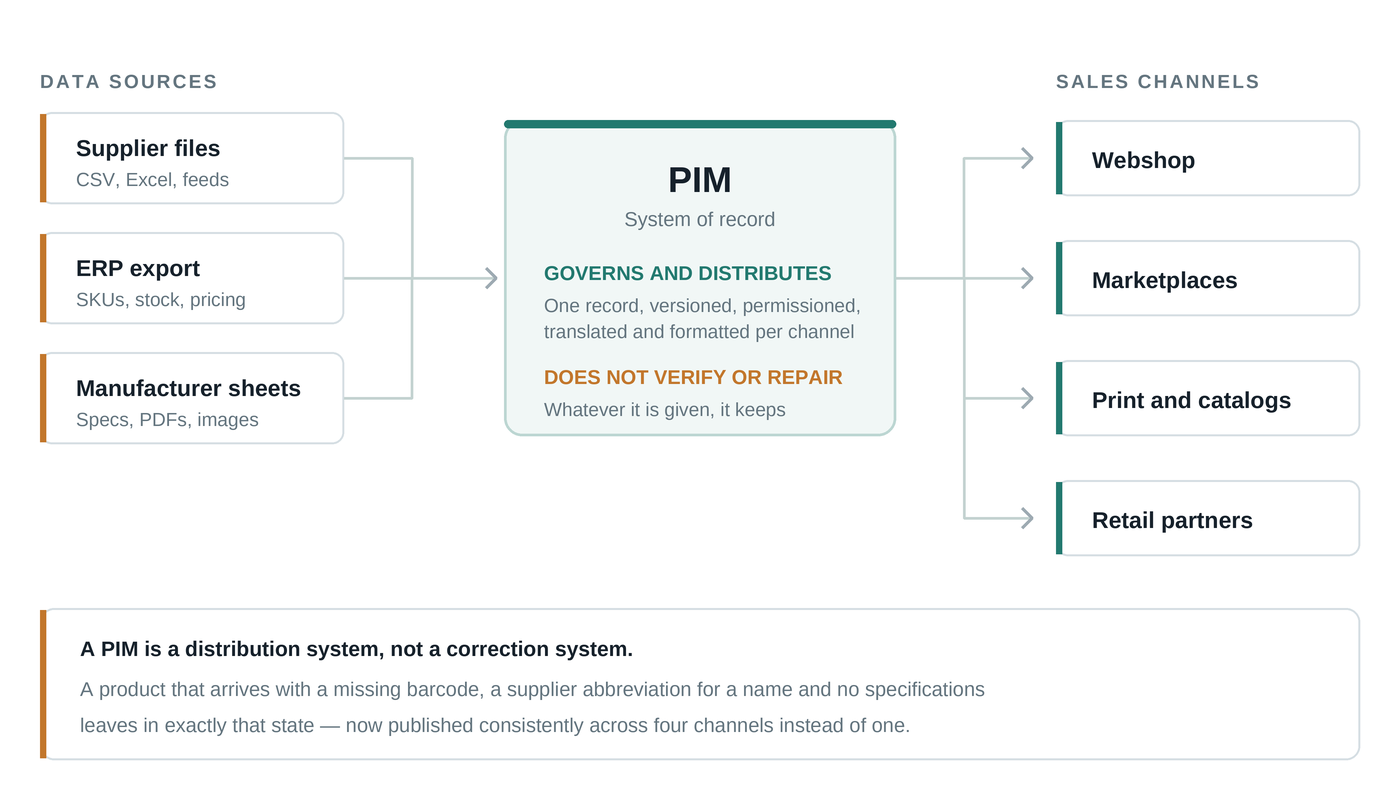
A PIM is a centralized database for product content, sitting between your data sources (suppliers, ERP, spreadsheets) and your sales channels (webshop, marketplaces, print catalogs, feeds). Its job is to be the single place where a product record lives, so that when a description changes, it changes everywhere at once instead of in four separate exports.
In practice, a PIM handles a specific set of jobs well:
- Central storage — one canonical record per product, instead of competing versions in ERP, Excel, and the webshop admin
- Workflow and governance — who can edit what, approval steps, completeness checks before a product goes live
- Channel syndication — pushing the right attributes in the right format to each marketplace, feed, or storefront
- Localization — managing translations and market-specific variants of the same product
- Versioning and audit — knowing what changed, when, and by whom
Notice what is missing from that list: nothing in a PIM *creates* good product data. A PIM validates that a field is filled in; it cannot tell you whether the EAN in that field actually belongs to that product, whether the brand name is spelled the way the manufacturer spells it, or whether the description is accurate. A PIM enforces structure. It does not supply truth.
What product enrichment actually does
Product enrichment is the work of completing and correcting product records. You start with what you have — often just a supplier's internal article code, a truncated name like "SAMS TV 55 QLED BLK," and a price — and end with a record a customer can actually find and trust: a full product name, the verified brand, the correct **EAN/GTIN barcode**, a category assignment, a proper description, structured specifications, and product images.
Enrichment breaks down into a few distinct tasks, and it's worth knowing which ones your catalog needs:
Identification and matching
Before you can enrich a product, you have to know exactly which product it is. This means resolving cryptic supplier names and internal codes to a real, unambiguous product — usually anchored by a GTIN. This is the hardest step and the one where most DIY attempts fail, because a wrong match poisons every attribute downstream. Matching "the wrong 55-inch TV" gives you a perfectly formatted record that is wrong in every field.
Attribute completion
Once the product is identified, missing fields get filled: brand, model, structured specs (dimensions, wattage, material, compatibility), and category. Categories matter more than teams expect — marketplaces reject miscategorized listings, and on your own store, a product filed in the wrong category is effectively invisible.
Content and media
Descriptions and images are what customers actually see. Enrichment supplies clean descriptions and usable product images for records that arrived with neither — which, for catalogs built from supplier price lists, is often the majority.
Verification
The step that separates enrichment from bulk copy-pasting: checking that the barcode, brand, and attributes genuinely belong together. This is why ProductBox charges only per successfully enriched product — a record that can't be confidently identified and verified shouldn't cost you anything, and shouldn't enter your catalog pretending to be complete.
The core difference: system vs process
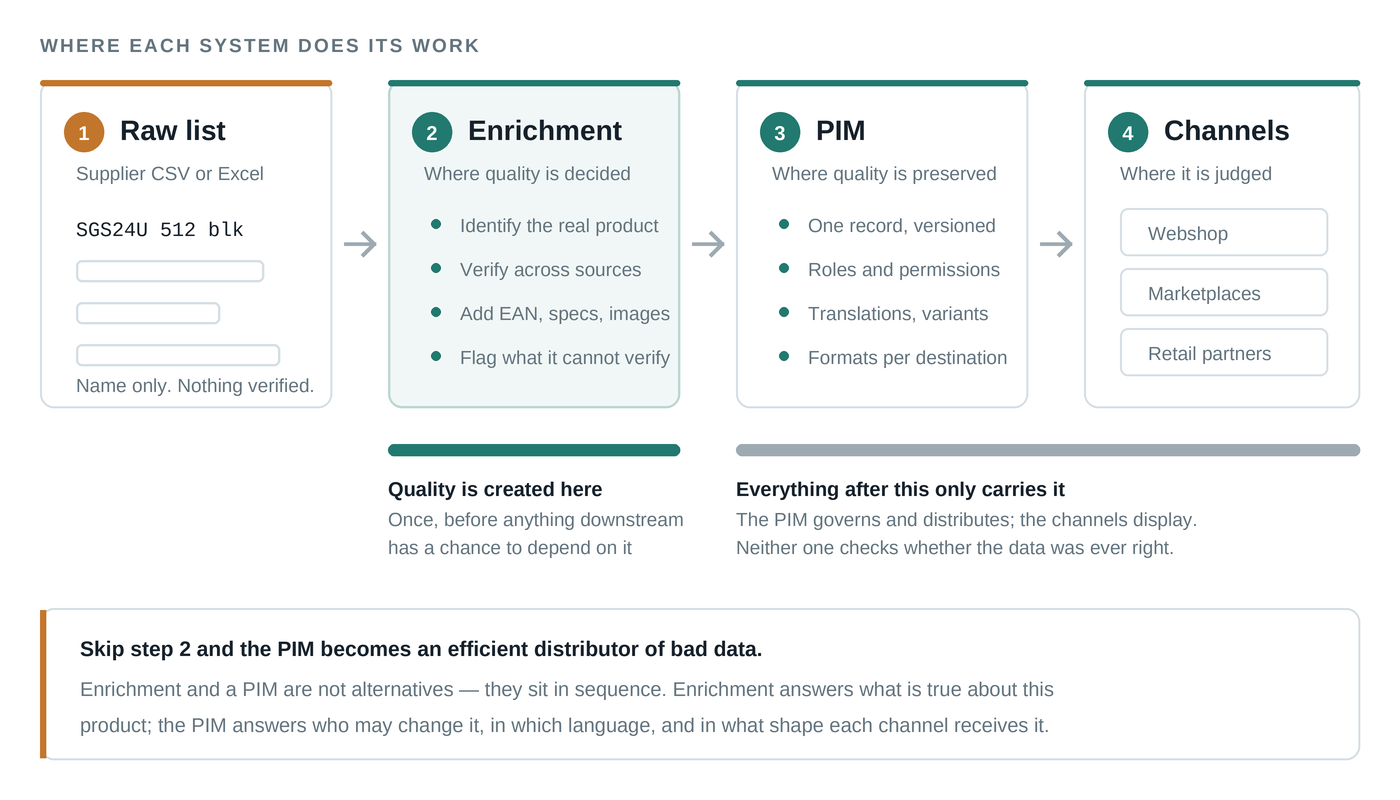
The cleanest way to hold the distinction: a PIM answers "where does our product data live and how does it flow?" Enrichment answers "is our product data actually complete and correct?" One is infrastructure, the other is data quality work.
This is why the comparison "PIM vs enrichment" is slightly misleading — they are not competing solutions to the same problem. But budgets are real, and teams do face the practical question of which to invest in first. That question has a clearer answer than most vendors admit.
Why a PIM won't fix bad data
The most expensive mistake in this space is implementing a PIM on top of an unenriched catalog. The migration project imports thousands of records, the completeness dashboards light up red, and the team spends the next year manually researching products inside the PIM's editing interface — doing enrichment by hand, one record at a time, in a tool that was never designed for it.
PIM implementations are judged on adoption and time-to-value, and both collapse when the data inside is untrustworthy. Merchandisers stop using a system they have to double-check. Channel exports get blocked by validation rules that half the catalog fails. The PIM didn't fail — it faithfully centralized data that was never fit for purpose.
The reverse ordering works far better: enrich first, then migrate. Sending your raw product list through an enrichment step before the PIM import means the system of record starts life actually being a record of something true. Completeness rules pass on day one, and the PIM does what it's good at — governance and distribution — instead of serving as a very expensive to-do list.
Planning a PIM migration? Run your export through enrichment first and use the verified results to define your PIM's attribute model. If your product names look like "ART-4471 BLK 55Q" and your EAN column is half empty, you have an enrichment problem, not a PIM problem.
When you need which — four common scenarios
Small catalog, one channel
A few hundred products sold on your own webshop: you likely don't need a PIM at all yet. Your shop platform's product database is a workable system of record at this scale. What you probably do need is enrichment — complete records with real barcodes, specs, and images convert better and are findable in search. Upload your list, get back verified data, import it. Done.
Growing catalog, incoming supplier feeds
Once you're regularly onboarding supplier price lists — each with its own naming conventions, missing attributes, and absent images — enrichment becomes a recurring process rather than a one-off. This is the stage where teams feel pain and reach for a PIM, but the pain is usually data quality, not data management. A repeatable enrichment step at the point of onboarding solves it more directly: raw CSV in, clean verified records out, then into whatever system you already run.
Multiple channels, multiple markets
Selling the same catalog on your store plus marketplaces, possibly in several languages: this is genuine PIM territory. Syndication, per-channel attribute mapping, and translation workflows are exactly what a PIM exists for. Enrichment still sits upstream — the PIM distributes what enrichment has verified.
Existing PIM, poor data inside it
Common and rarely admitted: the PIM is live, but completeness scores are stuck because nobody has time to research thousands of products manually. Here enrichment works as a batch repair — export the incomplete records, enrich them externally, re-import. Paying per successfully enriched product keeps the cost proportional to what actually gets fixed, which matters when you don't know in advance how many records are salvageable.
How they work together in practice
In a healthy setup, the two form a simple pipeline. Enrichment is the intake and repair step; the PIM (or, at smaller scale, your shop platform) is the home where clean data lives and flows from. Concretely:
- New supplier list arrives → send the raw CSV/Excel through enrichment → import verified records into your PIM or shop
- [Catalog audit](/resources/how-to-clean-product-data) finds gaps → export incomplete records → enrich in batch → re-import and watch completeness scores recover
- Marketplace expansion → enrichment fills the mandatory attributes (GTINs, categories, specs) the new channel demands → the PIM handles the per-channel formatting and syndication
- Ongoing operations → the PIM's completeness rules become your tripwire: records that fail get routed to enrichment instead of a manual research queue
The division of labor is clean because each side does what the other can't. No PIM will look up a missing EAN for you; no enrichment service will manage your approval workflows or push localized feeds to twelve channels. Treating them as substitutes is how catalogs end up with either well-organized bad data or excellent data scattered across spreadsheets.
The takeaway
A PIM is a system of record: it stores, governs, and distributes product data. Product enrichment is the process that makes that data complete and correct in the first place — verified names, brands, EAN/GTIN barcodes, categories, descriptions, specifications, and images. If your data is messy, enrichment comes first, whether or not a PIM is in your future; if your channels are multiplying, a PIM earns its keep — fed by enriched data, not by hope. Whatever your stack looks like, the sequence is the same: verify the data, then manage it.
The fastest way to see the difference enrichment makes is to test it on your own catalog. With ProductBox you upload a raw CSV or Excel list and get back complete, verified records — and you pay only for products that were successfully enriched, so a test run costs you nothing but the upload.
Frequently asked questions
Is ProductBox a PIM?
No, and deliberately so. ProductBox is an enrichment service: you send it a product list and it returns verified, complete records. It does not store your catalog as a system of record, manage approval workflows, or syndicate feeds to channels — those are a PIM's jobs. Most catalogs need the data fixed before they need another system to maintain.
Can a PIM enrich product data by itself?
A PIM can tell you a field is empty and block a product from going live until someone fills it. It cannot find the missing EAN, confirm the brand is spelled the way the manufacturer spells it, or verify that a barcode belongs to that exact variant. Some PIMs bundle enrichment features or integrations, but the work itself is matching against external sources — a different problem from managing records.
Do I need a PIM for a small catalog?
Usually not. Below roughly a thousand products on a single sales channel, your shop platform's own product database is a workable system of record, and a PIM adds licence cost and migration work without solving a problem you have. Multiple channels, multiple markets or a team that needs approval workflows are the signals that a PIM starts earning its keep.
Should I enrich before or after a PIM migration?
Before. Importing unenriched data means completeness rules fail on day one and the team ends up doing manual research inside the PIM's editing interface — the slowest possible place to do it. Enriching the export first means the system of record starts life holding verified data, and the migration is judged on distribution, not data repair.
Ready to clean up your product list?
Upload a raw CSV or Excel file and get back verified names, EANs, categories, descriptions and images. First 25 products are free.
Get started free →