How to Clean Product Data: A Practical Guide for E-commerce
Duplicate rows, mixed units, missing brands, mangled EANs — a practical five-step guide to cleaning an e-commerce product catalog and keeping it clean.
Every e-commerce catalog drifts toward chaos. Supplier exports arrive in different formats, the same product gets created twice under two names, units switch between millimetres and inches halfway down the column, and half the brand fields say "N/A". The symptoms show up downstream: feeds get rejected, filters return nonsense, search misses products you actually stock, and nobody fully trusts the numbers in the back office.
Cleaning product data is not a heroic one-off effort — it is a repeatable five-step process: audit what you have, deduplicate on identifiers, standardize formats and units, validate the critical fields, and fill the gaps that remain. This guide walks through each step in the order that saves the most work, and shows where cleaning ends and product enrichment begins.
Cleaning vs enrichment: know which problem you have
The two get mixed up because they usually happen together. Cleaning fixes the data you already have: removing duplicates, unifying formats, correcting invalid values. Enrichment adds data you do not have: the missing brand, the absent EAN, the empty description field. The distinction matters for planning, because cleaning is largely a rules-and-elbow-grease job you can do in-house, while filling gaps requires matching each product against external sources.
(A third term, the PIM, is a system that stores product data rather than a process that improves it — worth separating from both.) Do the cleaning first. Deduplicating and standardizing before you enrich means you pay to enrich each product once, not once per duplicate — and enrichment tools match far more reliably against tidy input.
Step 1: Audit your product data before touching anything
Start by profiling the catalog, column by column, and writing down what is actually wrong — not what you assume is wrong. Count empty cells per field (a pivot table or a COUNTBLANK column does this in minutes), list the distinct values in fields that should be controlled (brand, category, unit), and eyeball a random sample of full rows. An hour of auditing typically changes the whole cleanup plan.
The defects you are most likely to find:
- Duplicates — the same product entered twice with slightly different names, or re-imported under a new SKU
- Inconsistent formats — mixed units, mixed casing, prices with and without VAT, three different date formats
- Missing values — empty brand, category or identifier fields, or placeholders like "N/A", "unknown" and "-" that are worse than empty because they pass not-null checks
- Corrupted identifiers — EANs with stripped leading zeros or in scientific notation after a spreadsheet round-trip
- Junk in text fields — HTML fragments, encoding artifacts, ALL-CAPS supplier names and shipping notes pasted into descriptions
- Category chaos — several taxonomies living side by side after a migration or a merger of supplier feeds
Fix problems at the source where you can. If a supplier feed injects the same defect on every import, cleaning your copy is a treadmill — correct the import mapping or the supplier template instead.
Step 2: Deduplicate on identifiers, not names
Duplicates multiply every other problem, so remove them first. The reliable way is to match on identifiers in order of trustworthiness: group rows by GTIN/EAN first, then by brand + MPN, and only fall back to normalized product names for rows that have neither. Name-only matching is the weakest signal — "Samsung Galaxy S24 Ultra 256GB" and "GALAXY S24U 256 BLK" are the same product, while "S24" and "S24+" are not — which is exactly why identifiers exist. If your rows lack them, that is a gap for Step 5, and our product identifiers guide explains which codes to use. In a plain spreadsheet, a COUNTIF on the identifier column is enough to surface duplicate groups in minutes — just format identifier columns as text first so the codes survive intact.
When you find a duplicate group, merge rather than delete blindly: keep the row with the richest data as the survivor, pull any field values only the other rows have, and map the losing SKUs to the survivor so old references and order history do not break. And be careful not to over-merge — colour, size and capacity variants are separate products with their own GTINs, not duplicates of each other.
Step 3: Standardize formats, units and categories
Next, make every field mean one thing and look one way. Decide the canonical format for each column and convert everything to it: one unit system per attribute (with the unit stored in the column name or a separate field, never mixed into the value), one casing convention for names and brands, one price format, one date format. Brand fields deserve special attention — "Samsung", "SAMSUNG" and "Samsung Electronics" should collapse to a single canonical brand, or your filters and brand pages will fragment. Most of this work is find-and-replace plus a lookup table: a small brand-alias sheet and one conversion pass per unit column cover the bulk of it.
Categories need the same treatment at a larger scale: pick one taxonomy tree and map everything into it, rather than letting each supplier's category labels live on in parallel. Finally, split fields that carry two jobs — technical specifications belong in structured attribute fields, marketing copy belongs in the description, and neither belongs in the product name.
Write the rules down as a one-page data dictionary: every field, its format, its allowed values, one example. It turns cleanup decisions you made once into a standard everyone imports against.
Step 4: Validate identifiers and required fields
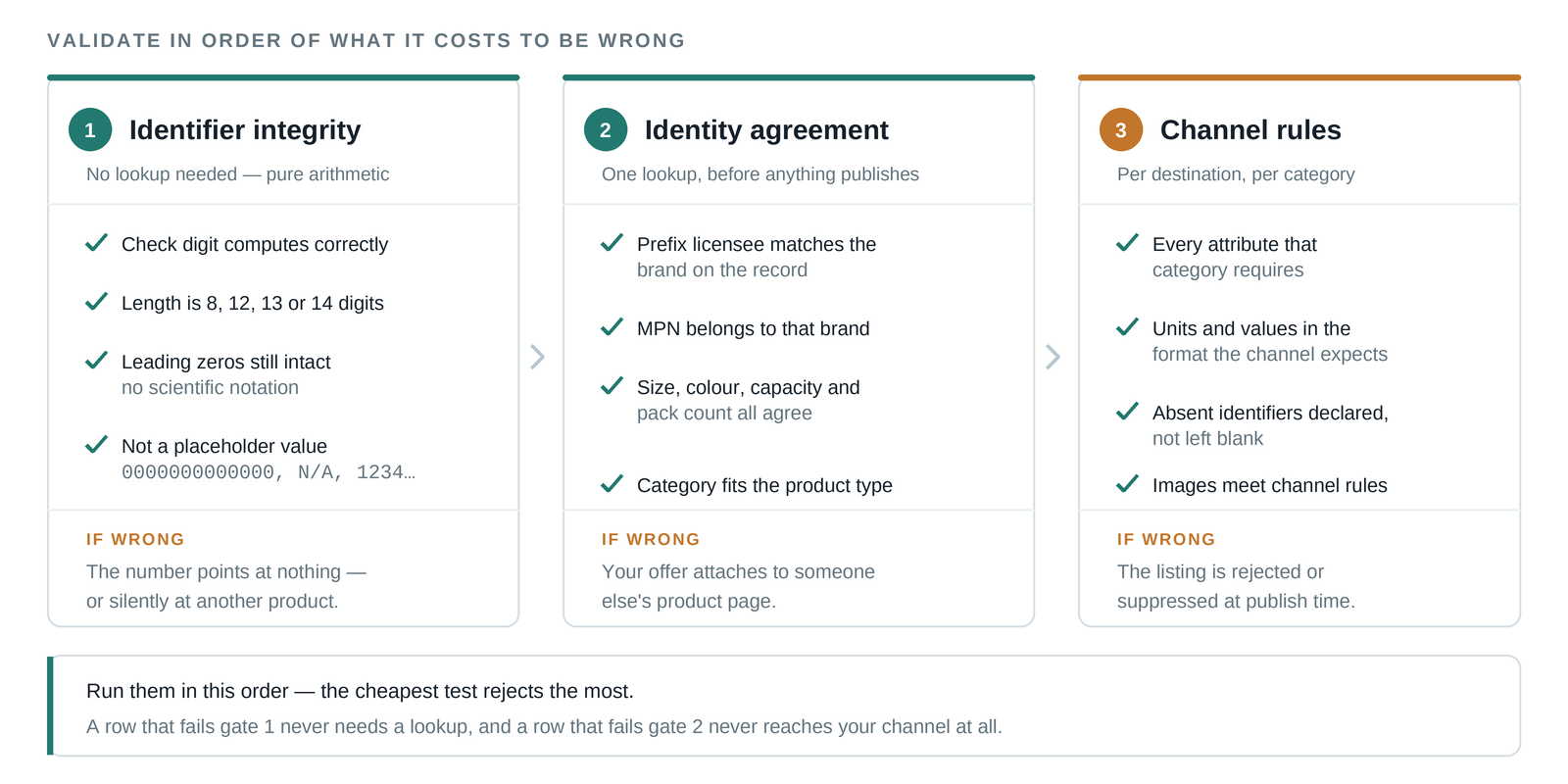
Standardized data can still be wrong, so validate the fields where wrong is expensive. For EANs and other GTINs, run a check-digit validation (one spreadsheet formula per row) — the last digit is computed from the others, so truncations and most typos surface instantly — and spot-check that the registered brand behind a code matches the brand on the row. Watch for the classic spreadsheet corruption of identifier columns (stripped leading zeros, scientific notation); we cover that failure mode in detail in the identifiers guide.
Then check completeness against your channels' requirements: every sales channel has required fields, and a row missing price, availability, image or identifier will bounce at feed time. Quarantine incomplete rows into a fix-list rather than letting them flow downstream — a feed that silently drops products is a harder bug to notice than a visible to-do list.
Step 5: Fill the gaps — where cleaning becomes enrichment
After the first four steps you will have a tidy catalog with visible holes: rows with no EAN, no brand, no category, a one-line description or no usable image. Cleaning cannot manufacture that data; it has to come from outside — by identifying which real-world product each row is and pulling the verified details for it. Doing this by hand means searching each product, cross-checking sources and copying fields, which is fine for twenty rows and hopeless for five thousand.
This is the step ProductBox automates. You upload the cleaned list as CSV or Excel, each row is matched to the product it describes and verified against live sources, and back comes a complete record — EAN/GTIN, brand, canonical name, category, description, specifications and images — with a confidence score per row and how many independent sources agree. Products that cannot be matched confidently go to human review instead of being guessed, and you pay only for rows that were successfully enriched — which is exactly why deduplicating first, in Step 2, directly saves money.
Keep it clean: prevention and the takeaway
Data cleaned once will rot again unless the inflow changes. Make the data dictionary the required template for every supplier and every import; enforce required fields and formats at entry rather than fixing them downstream; keep identifier columns formatted as text everywhere spreadsheets are involved; and re-run the Step 1 audit on a schedule, because a quarterly hour of profiling catches drift while it is still small.
The short version of this whole guide: audit before you act, deduplicate on identifiers, standardize to one format per field, validate where mistakes are expensive, and enrich the gaps from verified sources. Clean product data is not a project with an end date — it is a standard your catalog either has or does not.
If your audit turns up hundreds of rows with missing brands, identifiers or descriptions, that part does not need to be manual.
Frequently asked questions
What does it mean to clean product data?
Cleaning product data means fixing what is already in your catalog: removing duplicate records, standardizing formats and units, correcting invalid values and quarantining incomplete rows. It is distinct from enrichment, which adds data you do not have — missing brands, identifiers, descriptions and images.
How often should product data be cleaned?
Audit quarterly and clean on every inflow. New supplier feeds and imports are where defects enter, so enforcing formats at entry plus a scheduled hour of profiling keeps the catalog clean — a one-off cleanup that is not followed by prevention rots back within a few import cycles.
Can product data cleaning be automated?
The rules-based parts — deduplication on identifiers, format and unit standardization, check-digit validation — automate well with spreadsheet formulas or scripts. Filling gaps is different: missing brands, EANs and descriptions have to be resolved against external sources, which is a product matching problem rather than a cleanup rule. That is the part tools like ProductBox automate, paying only per verified result.
Ready to clean up your product list?
Upload a raw CSV or Excel file and get back verified names, EANs, categories, descriptions and images. First 25 products are free.
Get started free →